ShotSpot
ShotSpot is a tennis match shot-tagging application I designed for my Year 12 VCE Software Development School-Assessed Task in 2023 at Catherine McAuley College Bendigo. The user watches a replay of a match and taps a button for how each point ended — a forehand winner, a backhand unforced error into the net, and so on — and the program collates those data points into a match summary and a running player profile, so players and coaches can see which parts of their game are costing them points.
The SAT runs the whole software development process on one solution: analysis and a requirements specification, a design folio, building the working program in VB.NET, usability and functional testing, and an evaluation of both the solution and the project plan. This page walks through all of it.
The client and the brief
My client was the Bendigo Tennis Club, which I worked with through its president, Damien Saunder. The club wanted something that recreational and club players — from C Grade up to A Grade — could use without much computer experience, since a survey I ran through the club's WhatsApp group (18 responses) showed that a perceived lack of computer skills was the main thing putting members off using analysis tools at all. Almost everyone surveyed played at least once a week, so the app needed to suit regular use.
To gather requirements I used three data collection methods:
- a written interview with the client, answered in their own time and returned to me;
- an 18-response Google Form survey of club members, on features, dislikes and non-functional wants;
- desktop research into usability and accessibility, which fed directly into the interface decisions below.
Choosing a development model
I compared the waterfall, spiral and agile models. Waterfall was too rigid for a project this long and gave the client too few chances to feed back; spiral was heavier than a project this size warranted and its open-ended number of phases made the deadline hard to plan against. I chose an agile model and split the program into three independently buildable pieces — the loading screen, the input screen and the match database screen — so I could get working parts in front of the client early and adjust as I went. In practice the build ran much closer to waterfall, for reasons I get into in the evaluation below.
Software requirements specification
The SRS set the scope. The prototype targets a Windows Forms app written in VB.NET on my school laptop, with the form canvas sized to an iPad screen because the intended final environment is an iPad (7th generation or later) with touch input. Data is stored locally in XML files, with no network dependency.
The functional requirements the program has to meet:
- enter names for Player A and Player B;
- enter match details — event, court surface and match format;
- show live match stats while points are being recorded;
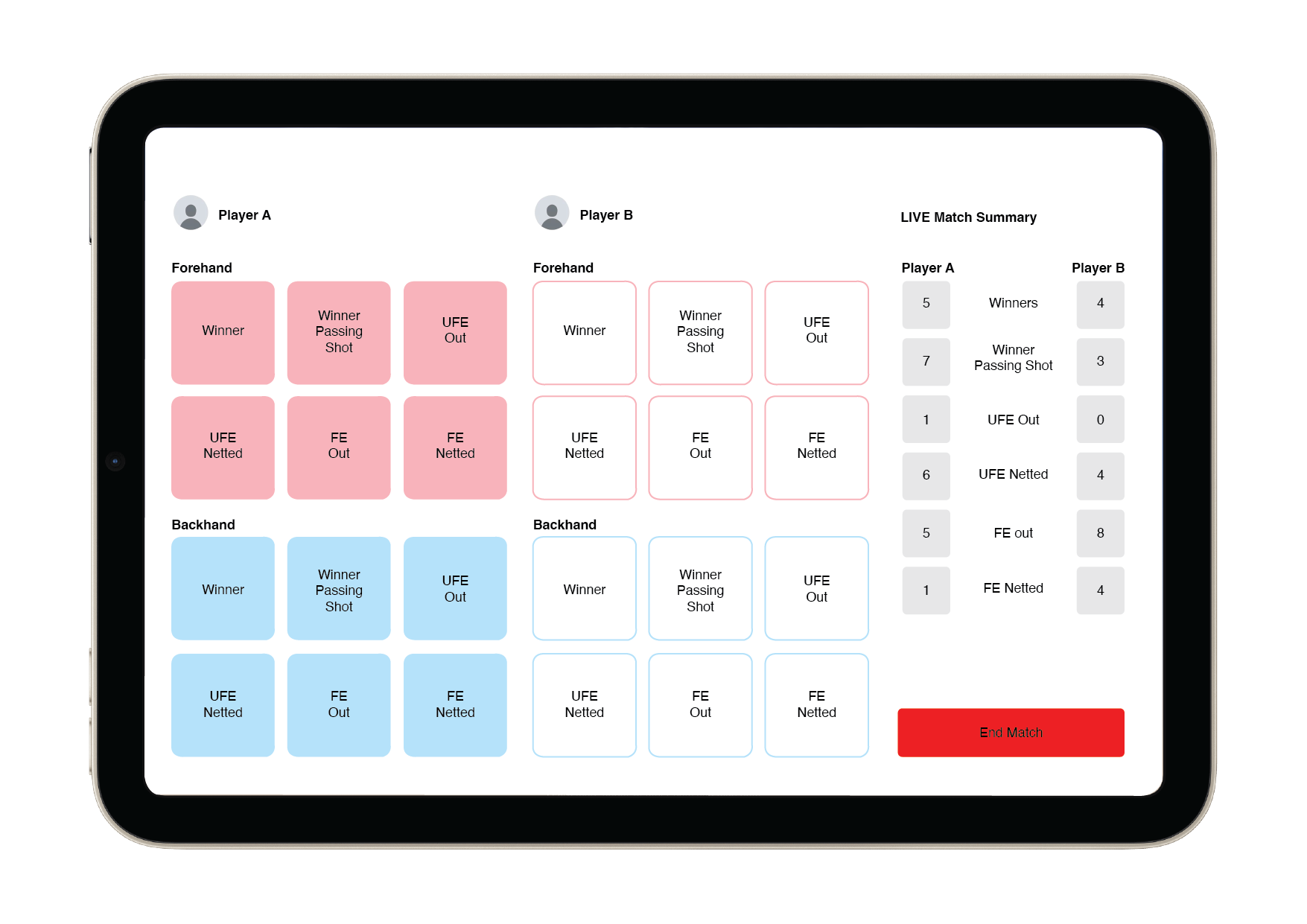
- record how each point ended on the forehand or backhand side: winner, winner passing shot, unforced error (out or netted) and forced error (out or netted);
- retrieve details of previous matches in a separate interface;
- retrieve career and season totals and averages through search.
The main non-functional requirements were fast, reliable reading and writing of the stats files; per-player privacy so one player cannot look up another's stats; and a user-friendly interface with large buttons, tooltips and a help menu. Scope was kept deliberately tight with a MoSCoW list — file encryption and multi-platform support were explicitly ruled out for the time available.
Design folio
My accessibility and usability research drove most of the interface decisions. Square buttons beat circular ones because a larger click target is the difference between a hit and a mis-tap when you are logging shots quickly. Large text and strong colour differentiation help visually impaired users. Forehand and backhand shots are colour-coded (pink and blue), Player A's buttons are filled and Player B's are outlined, and every screen shares one colour scheme and typeface so the user is not disoriented moving between them. The aim was the fewest buttons and words that still make each action obvious.
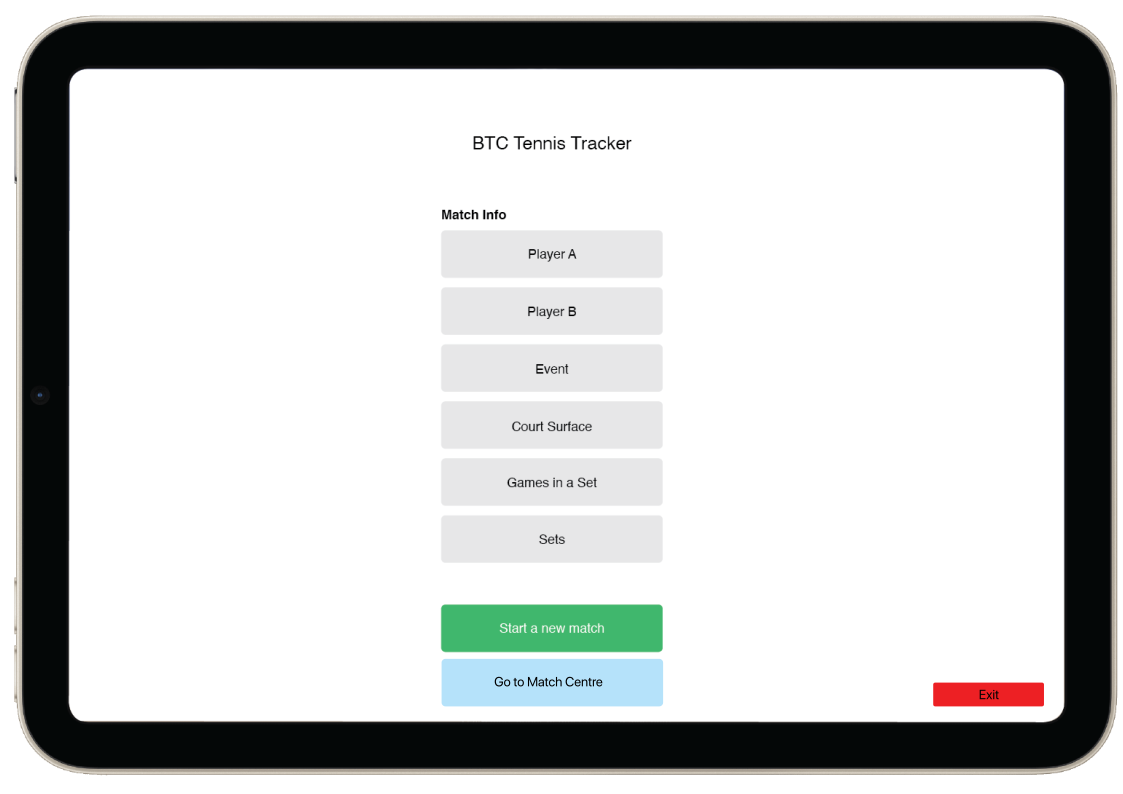
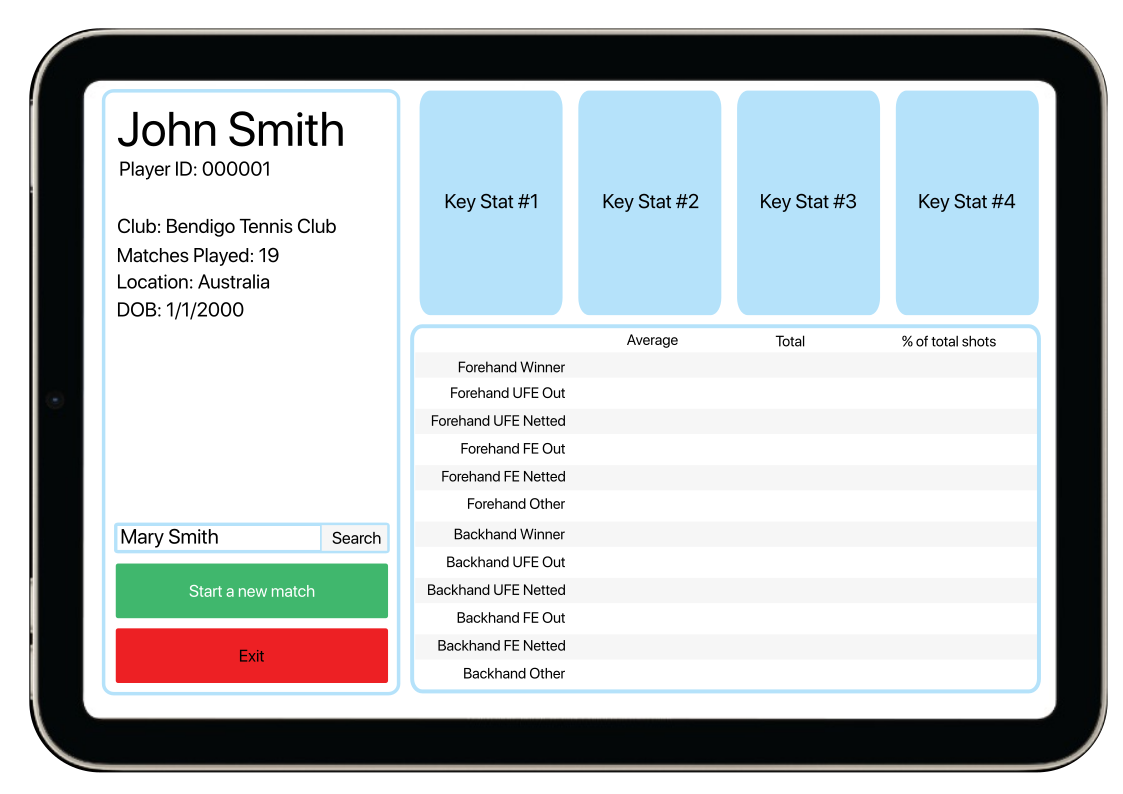
The folio also included a data dictionary and pseudocode for the core
routines — starting a new match, adding a player, writing a tagged
shot into the match file while updating the live counts, and rebuilding
a player's averages and totals by reading back across every match file.
The data model started as three objects: player,
match and shots, persisted as XML.
Building it
The program is a VB.NET Windows Forms app of roughly 2,500 lines across
three forms — login, start screen and shot input — plus a
match-summary screen. Because an iPad's native resolution was too large
to display on my laptop, I built each form at a smaller 4:3 size that
keeps the iPad proportions. A global matchClass object holds
all the match details and the running shot counts in memory; nothing is
written to disk until the match ends.
- Shot input. 24 buttons — six outcome types × forehand/backhand × two players. A click increments that shot's counter and pulses the matching live-summary label green so the user can see the input registered. Forehand and backhand of the same outcome are summed in the live view; the full split is kept for the summary.
-
Storage. On "End tracking of match" the whole
matchClassis written out asmatch1.xml,match2.xmland so on — the file name is just a counter, with no player names in it. - Logins. Each user gets their own username and password; passwords are stored as a SHA-512 hash with a 100-character random salt, never in plain text.
- Encryption. Player names, the event and the date are AES-encrypted inside the match file, so opening the raw XML tells you nothing sensitive.
- Match summary. At the end of a match the program builds a formatted summary and emails it to an address the user types in, via Outlook automation. This replaced the Match Centre as the way to get data out of the program.
Usability testing
I ran four moderated sessions with a consent form, a demographic questionnaire and handwritten observation notes: two with a peer, one with my 14-year-old sister as a low-experience user, and one with the client, who used it live while watching a professional match on video. Each round fed a list of changes back into the program. Among them:
- Enter key now submits the login — every tester pressed it by habit.
- You are logged straight in after creating an account, instead of signing up and then logging in.
- The email field is pre-filled with a placeholder that clears when you tap it, and a "sending, please wait" message shows on click so users don't give up mid-send.
- "Required" labels above the match-detail fields, so nobody hits a validation error for a blank they didn't know they had to fill.
- Wording fixes from the client: "Start tracking a new match", "End tracking of match", clearer confirmation dialogs, plain-English email copy.
- Most of the custom Exit buttons were removed once I saw nearly everyone used the standard window "X" instead.
Functional testing
Alongside the usability work I kept a testing table for individual
features. It caught real bugs: a string-length check that wasn't
returning False over 64 characters, so an over-long name
started a match and then corrupted the XML; and a match starting with no
radio button selected, fixed by defaulting each group to its most common
value on load. Validation covers existence, type and range on every
field, including the match date (no future dates, nothing before 1800).
Evaluation and reflection
What got cut. The Match Centre — loading past matches back out of the XML files and showing career stats — was marked borderline-scope in the SRS, and I dropped it when I came back from four weeks away and saw how much was left. The emailed summary is the lighter replacement.
The development model. The agile plan didn't survive contact with the project. The forms were too interconnected to build and sign off in isolation, and losing four weeks meant I coded almost everything in one three-week block and evaluated at the end — waterfall in all but name. That did keep the forms consistent with each other, but it left no room to revisit earlier decisions.
Efficiency. Windows Performance Monitor and VB's diagnostics put the app at around 1% average CPU and 16–21 MB of RAM, with a single ~10% CPU spike when it hands off to Outlook to send the email. Light enough for any machine the club would run it on.
What I'd do differently. The clearest lesson, pointed out by peers, is the 24 shot counters: they should have been an array, not 24 named variables with a near-identical click handler each. It works and it's fast, but it's far more code than the problem needs.